
WhatsApp automation that replies, follows up and sells while you work

WebTiger sets up the official WhatsApp Business API for your business, with instant replies, order updates, cart recovery and broadcasts to opted-in lists. Every lead gets a fast answer, even after office hours.

What our WhatsApp automation covers

Six parts of WhatsApp automation, handled by one team

Most businesses answer WhatsApp by hand and miss messages after hours. We treat WhatsApp as six connected jobs, each one tied to faster replies and more sales.

Official Business API setup

We set up the official WhatsApp Business API with a verified business profile, so your number can message customers at scale.

Business verification
Display name and profile
Message template approval
Instant replies and chatbots

Welcome messages, FAQ answers and simple menus that reply in seconds, then hand over to your team when needed.

Instant welcome replies
FAQ and menu chatbot
Handover to a person

Order and booking updates

Order confirmations, shipping updates and appointment reminders sent automatically from your store or booking system.

Order and COD confirmations
Shipping and delivery updates
Appointment reminders

Cart recovery messages

Shoppers who leave items in their cart get a friendly WhatsApp reminder with a link back to checkout.

Abandoned cart reminders
Direct checkout links
Follow-up timing set by you

Broadcasts to opted-in lists

Offers, launches and updates sent only to customers who agreed to hear from you, so your number stays in good standing.

Opt-in collection
List segments
Broadcast scheduling

CRM and ads integration

WhatsApp leads from Meta ads, your website and QR codes flow into one shared inbox and your CRM.

Click-to-WhatsApp ads
Shared team inbox
Leads sent to your CRM
Why WebTiger WhatsApp is different

We set up WhatsApp the way you sell

Automation is only useful if it brings sales and saves time. Every WebTiger WhatsApp setup starts with one question: which messages does your team send again and again? Then we automate those first and keep a person in the loop for the rest.

01

Sales, not spam

We only message people who opted in, with useful updates and offers, so customers stay happy and your number stays safe.

02

Tested on our own store

We run WhatsApp order updates and cart recovery for our own Shopify brand, KartTiger, before we set them up for you.

03

Ads and WhatsApp, one team

The team that runs your Meta ads also builds your WhatsApp flows, so every ad lead gets an instant reply.

04

You own everything

Your WhatsApp Business account, number, templates and contact lists stay in your name from day one.

WhatsApp and marketing, planned together

Your WhatsApp flows are built around the ads and pages that bring leads

Most businesses run ads with one vendor and answer WhatsApp by hand. At WebTiger the same team plans both, so every lead from ads, your website or a QR code gets the right message at the right time.

Click-to-WhatsApp ads connected to instant replies
Website and QR code chats tagged by source
Order updates linked to your store
Cart recovery for Shopify and WooCommerce
Opt-in lists built from every channel
One report covering chats, replies, orders and sales
How we set up your WhatsApp

A clear plan, with a date on every step

WEEK 1

Plan and verify

We map the messages your team sends most, then start Business API setup and verification.

WEEK 2

Build the flows

Welcome replies, FAQ menus, order updates and cart recovery messages written, and templates sent for approval.

WEEK 3

Test and launch

Every flow tested on real phones with your team, then switched on for customers.

AFTER LAUNCH

Support and grow

Monthly checks, new flows and a plain-number report on chats, replies and sales, with clear next steps.

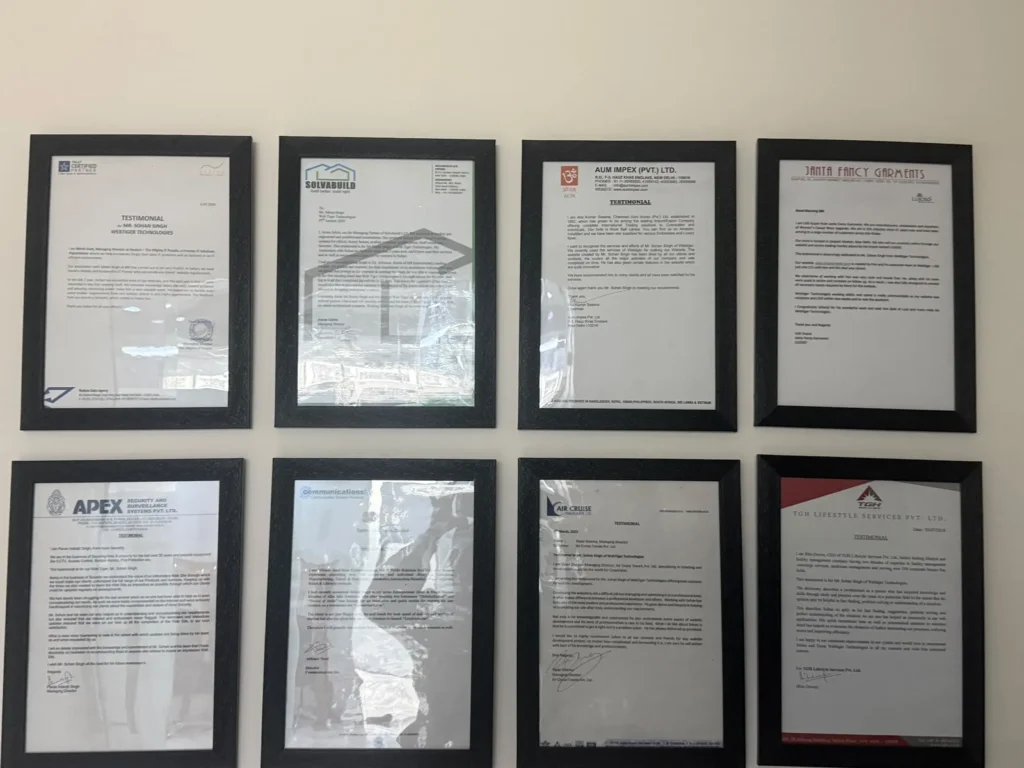
Framed client testimonial letters on the WebTiger office wall
Client letters

Our clients put it in writing

These framed testimonial letters hang on our office wall in Noida, from businesses including Aum Impex, Solvabuild, Apex Security, Air Cruise Travels, TGH Lifestyle and Janta Fancy Garments. Come and read them over a chai.

WhatsApp questions

What business owners ask us about WhatsApp automation

Still unsure? Call +91 8512022190, Monday to Friday, 9:00 to 19:00.

Do I need the WhatsApp Business API?

If you want automated replies, order updates or broadcasts at scale, yes. The regular WhatsApp Business app works for small volumes but cannot run these flows.

Can I keep my current number?

Usually yes. A number already on the WhatsApp app has to be moved to the API first. We guide you through it before setup.

Will my number get blocked?

We only message people who opted in and use templates approved by WhatsApp, which keeps your number in good standing.

Are there WhatsApp charges?

Yes. WhatsApp charges for business messages. We explain the costs for your use case before we start.

Who owns the WhatsApp account?

You do. Your WhatsApp Business account, number, templates and contact lists stay in your name.

More from WebTiger

Other services from our Noida team

Most clients use two or three of our services together. One team plans them all, so your website, search, ads and WhatsApp work towards the same enquiries.

Free WhatsApp review

Find out how many leads you lose on WhatsApp. Free.

Tell us how your team uses WhatsApp today. We check your reply times, repeated messages and order updates, and show you the three automations that will save the most time and bring the most sales.

Reply speed and missed chats
Messages your team types again and again
Order, cart and booking updates
What your top competitors do differently

How the free WhatsApp review works

1

Send your link

Share your number and website through the form or on WhatsApp.

2

We record a WhatsApp review

A short screen recording of your current setup and the flows we suggest, ready within two working days.

3

Get your top three fixes

Clear, ranked changes you can make yourself or hand to us.

Or call +91 8512022190

Scroll to Top